WCF Service
How to check if a User ID already exits or not in the database using a WCF Service.
In this article We am going to discuss how to create a WCF Service and use in asp.net 3.5. You can also use this service at registration time to check duplicate data.
How to Create a WCF service:
Step 1: To create new WCF Service Open new web site and select WCF service like as follows:

Step 2: By default you will get the following page.

Step 3: Now add the following code into Service class to get record from the database.
//This function is used to get Userid from database.
public DataSet GetUserId()
{
SqlConnection con = new SqlConnection("Data Source = Puru-SQLSERVER2005; Initial Catalog = Puru; User ID = sa; Password = wintellect;");
string cmd = "select UserID from Registration";
SqlDataAdapter da = new SqlDataAdapter(cmd, con);
con.Open();
DataSet ds = new DataSet();
da.Fill(ds);
con.Close();
return ds;
}
For example:
Service.cs
using System;
using System.Collections.Generic;
using System.Linq;
using System.Runtime.Serialization;
using System.ServiceModel;
using System.Text;
using System.Data;
using System.Data.SqlClient;
public class Service : IService
{
public string GetData(int value)
{
return string.Format("You entered: {0}", value);
}
public CompositeType GetDataUsingDataContract(CompositeType composite)
{
if (composite.BoolValue)
{
composite.StringValue += "Suffix";
}
return composite;
}
//This function is used to get Userid from database.
public DataSet GetUserId()
{
SqlConnection con = new SqlConnection("Data Source = Puru-SQLSERVER2005; Initial Catalog = Puru; User ID = sa; Password = wintellect;");
string cmd = "select UserID from Registration";
SqlDataAdapter da = new SqlDataAdapter(cmd, con);
con.Open();
DataSet ds = new DataSet();
da.Fill(ds);
con.Close();
return ds;
}
}
Service.svc:
<%@ ServiceHost Language="C#" Debug="true" Service="Service" CodeBehind="~/App_Code/Service.cs" %>
Step 4:
Build the application and debug; you will get the following output.
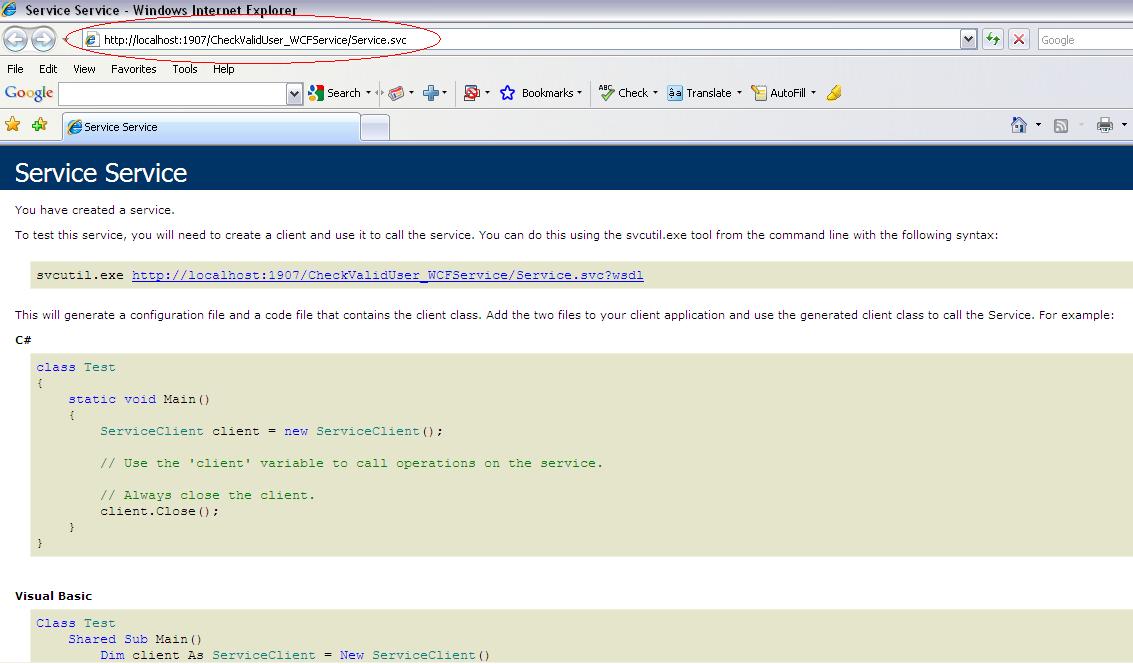
How to use WCF service in my application?
Step 5:
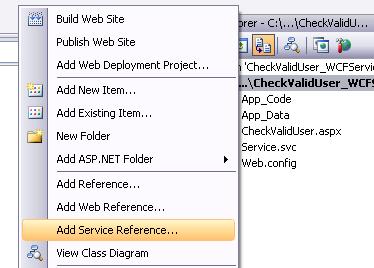
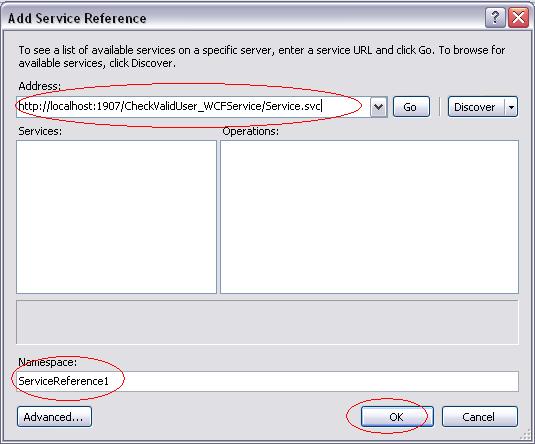
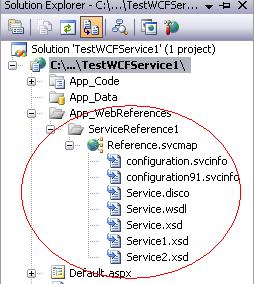
If you want to use this service in to different application then copy the URL of this wcf service like as http://localhost:1907/CheckValidUser_WCFService/Service.svc and add the reference of this service into appropriate application like as
Step 6:
And if you want to use wpf service in to same application then leave step 5. And add a new web page into first application.
<%@ Page Language="C#" AutoEventWireup="true" CodeFile="CheckValidUser.aspx.cs" Inherits="CheckValidUser" %>
DOCTYPE html PUBLIC "-//W3C//DTD XHTML 1.0 Transitional//EN" "http://www.w3.org/TR/xhtml1/DTD/xhtml1-transitional.dtd">
<html xmlns="http://www.w3.org/1999/xhtml">
<head runat="server">
<title>title>
head>
<body>
<form id="form1" runat="server">
<div>
<asp:TextBox ID="textUserId" runat="server">asp:TextBox>
<asp:Button ID="getUserId" runat="server" OnClick="getUserId_Click" Text="Verify" />
<asp:Label ID="lblMessage" runat="server">asp:Label>
div>
form>
body>
html>
using System;
using System.Collections.Generic;
using System.Linq;
using System.Web;
using System.Web.UI;
using System.Web.UI.WebControls;
using System.Data;
using System.Data.SqlClient;
public partial class CheckValidUser : System.Web.UI.Page
{
Service wcfService = new Service();
protected void Page_Load(object sender, EventArgs e)
{
}
protected void getUserId_Click(object sender, EventArgs e)
{
DataSet ds = new DataSet();
ds = (wcfService.GetUserId());
if (ds.Tables[0].Rows.Count > 0)
{
foreach (DataRow row in ds.Tables[0].Rows)
{
string UserId = row["UserId"].ToString();
if (UserId == textUserId.Text)
{
lblMessage.Text = "Valid";
break;
}
else
lblMessage.Text = "InValid";
}
}
}
}
OutPut: You will get the following output.
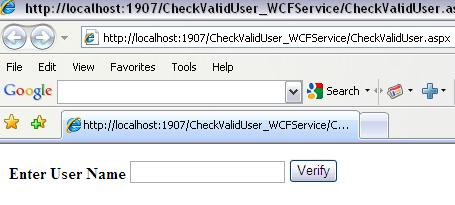
Here I am entering a valid name which exists in to database.

Here I am entering an invalid name which does not exist in to database.

| ||||||||||
|
|
|
|

No comments:
Post a Comment