One of the most common functionality in any ASP.NET application is to print forms and controls.
In this article, I am going to show how can we achieve this print functionality in our asp.net application. For this, I created a PrintHelper class. In this class, I made a method 'PrintWebControl'. With this method we can print any server control alike GridView, DataGrid, Panel, TextBox etc.
This is my PrintHelper.cs
using System;
using System.Data;
using System.Configuration;
using System.Web;
using System.Web.Security;
using System.Web.UI;
using System.Web.UI.WebControls;
using System.Web.UI.WebControls.WebParts;
using System.Web.UI.HtmlControls;
using System.IO;
using System.Text;
using System.Web.SessionState;
///
/// Summary description for PrintHelper
///
public class PrintHelper
{
public PrintHelper()
{
//
// TODO: Add constructor logic here
//
}
public static void PrintWebControl(Control ctrl)
{
PrintWebControl(ctrl, string.Empty);
}
public static void PrintWebControl(Control ctrl, string Script)
{
StringWriter stringWrite = new StringWriter();
System.Web.UI.HtmlTextWriter htmlWrite = new System.Web.UI.HtmlTextWriter(stringWrite);
if (ctrl is WebControl)
{
Unit w = new Unit(100, UnitType.Percentage); ((WebControl)ctrl).Width = w;
}
Page pg = new Page();
pg.EnableEventValidation = false;
if (Script != string.Empty)
{
pg.ClientScript.RegisterStartupScript(pg.GetType(), "PrintJavaScript", Script);
}
HtmlForm frm = new HtmlForm();
pg.Controls.Add(frm);
frm.Attributes.Add("runat", "server");
frm.Controls.Add(ctrl);
pg.DesignerInitialize();
pg.RenderControl(htmlWrite);
string strHTML = stringWrite.ToString();
HttpContext.Current.Response.Clear();
HttpContext.Current.Response.Write(strHTML);
HttpContext.Current.Response.Write("");
HttpContext.Current.Response.End();
}
}
Here, in this application, I created 2 pages. First is the default page of the content that I want to print.On the same page, I set a Print button also. When it will be clicked, it will redirect the user to the second page, named as 'Print.aspx'.
Default.aspx
<%@ Page Language="C#" AutoEventWireup="true" CodeFile="Default.aspx.cs" Inherits="_Default" %>
DOCTYPE html PUBLIC "-//W3C//DTD XHTML 1.0 Transitional//EN" "http://www.w3.org/TR/xhtml1/DTD/xhtml1-transitional.dtd">
<html xmlns="http://www.w3.org/1999/xhtml">
<head runat="server">
<title>Pring in ASP.NETtitle>
head>
<body>
<form id="form1" runat="server">
<div>
<asp:Button ID="btnPrint" runat="server" Text="Print" OnClick="btnPrint_Click" /><br />
<asp:Panel ID="pnl1" runat="server">
<table cellpadding="4" cellspacing="4" width="50%" align="center">
<tr>
<td align="center">
Fill all information
td>
tr>
<tr>
<td>
<asp:Label ID="Label1" runat="server" Text="Email" Width="130px">asp:Label>
<asp:TextBox runat="server">asp:TextBox>
td>
tr>
<tr>
<td>
<asp:Label ID="Label2" runat="server" Text="Name" Width="130px">asp:Label>
<asp:TextBox ID="TextBox1" runat="server">asp:TextBox>
td>
tr>
<tr>
<td>
<asp:Label ID="Label6" runat="server" Text="Country" Width="130px">asp:Label>
<asp:TextBox ID="TextBox5" runat="server">asp:TextBox>
td>
tr>
<tr>
<td>
<asp:Label ID="Label3" runat="server" Text="Mobile" Width="130px">asp:Label>
<asp:TextBox ID="TextBox2" runat="server">asp:TextBox>
td>
tr>
table>
asp:Panel>
div>
form>
body>
html>
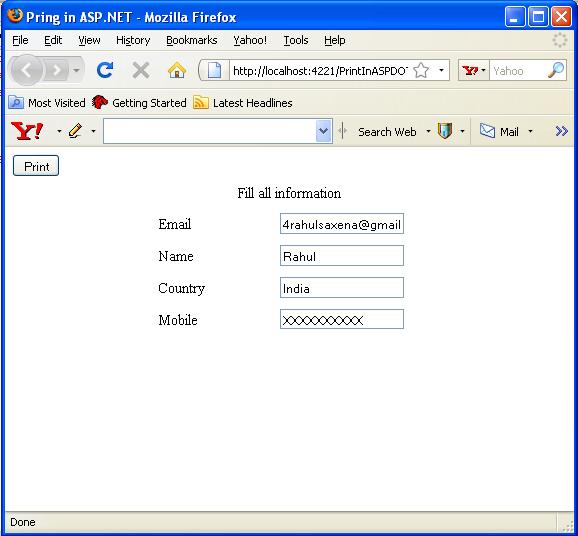
Image 1.
Click event of 'print' button is:
protected void btnPrint_Click(object sender, EventArgs e)
{
Session["ctrl"] = pnl1;
ClientScript.RegisterStartupScript(this.GetType(), "onclick", "");
}
When, the 'Print' button is clicked,screen will be looking as
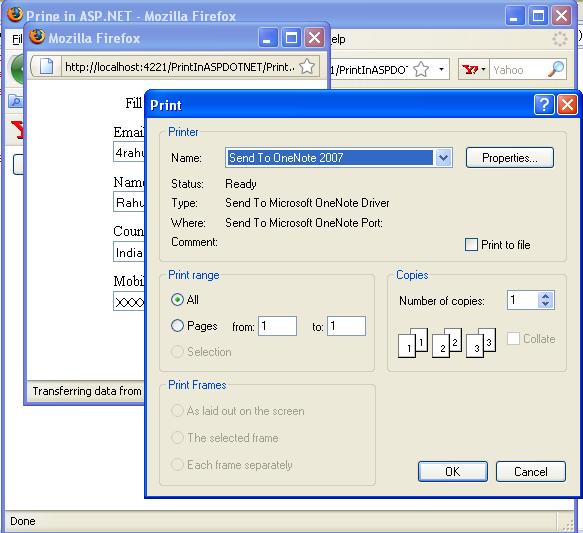
Image 2.
Following is the load event of this page, 'Print.aspx':
protected void Page_Load(object sender, EventArgs e)
{
Control ctrl = (Control)Session["ctrl"];
PrintHelper.PrintWebControl(ctrl);

No comments:
Post a Comment