In this step-by-step article, I talk about how to create a Windows Service using Visual Studio 2005 and .NET Framework 2.0.
In Visual Studio 2005,
Step 1: Select File -> New -> Project
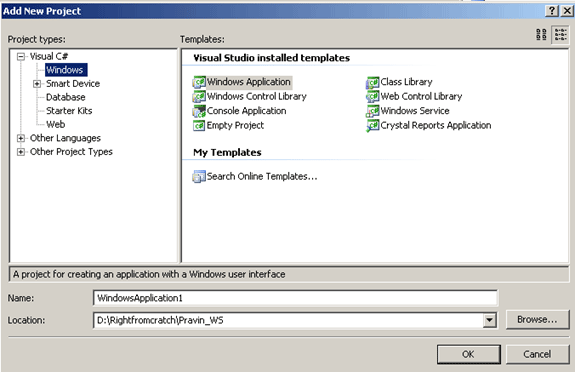
Step 2: Add new project dialog box opens. In that left side pane, expand Visual C#. Click on Windows. In the right side pane, some templates will be displayed.
Select Windows Service from the installed templates. Give some name for the windows service.
Step 3: Once you click "OK" in the above dialog box, the following screen appears.
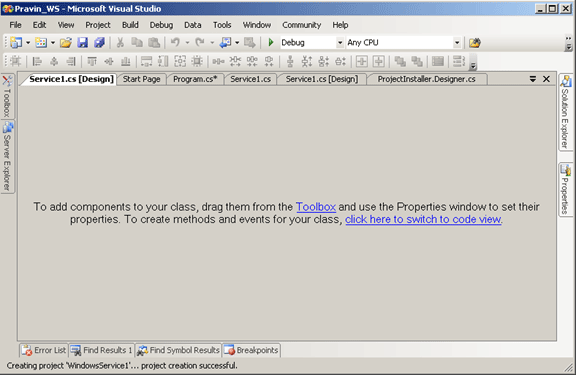
Step 4: Now click on the link ("Click here to switch to code view") and the following screen appears
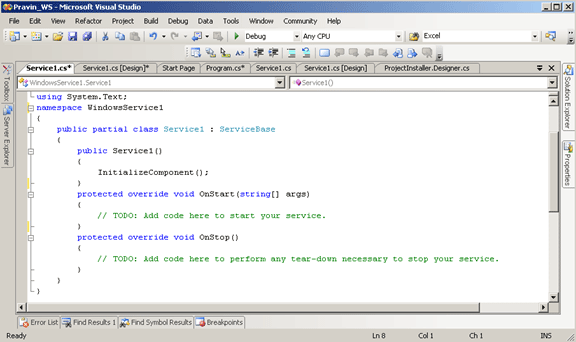
Step 5: Now replace the overridden OnStart and OnStop methods will the following code. The OnStart event code executes when a service starts and OnStop event code executes when the service stops.
On the OnStart event, I create a text file and have a timer settings. On the OnStop event, I write more text to the text file.
protected override void OnStart(string[] args)
{
FileStream fs = new FileStream(@"c:\temp\pravin.txt",
FileMode.OpenOrCreate, FileAccess.Write);
StreamWriter m_streamWriter = new StreamWriter(fs);
m_streamWriter.BaseStream.Seek(0, SeekOrigin.End);
m_streamWriter.WriteLine("Service Started on \n" + DateTime.Now.ToShortDateString() + " at " + DateTime.Now.ToShortTimeString());
m_streamWriter.Flush();
m_streamWriter.Close();
_timer.Change(0, 30000); // Commented Lines
}
protected override void OnStop()
{
FileStream fs = new FileStream(@"c:\temp\mcWindowsService.txt",
FileMode.OpenOrCreate, FileAccess.Write);
StreamWriter m_streamWriter = new StreamWriter(fs);
m_streamWriter.BaseStream.Seek(0, SeekOrigin.End);
m_streamWriter.WriteLine(" mcWindowsService: Service Stopped \n" + DateTime.Now.ToShortDateString() + " at " + DateTime.Now.ToShortTimeString());
m_streamWriter.WriteLine(" *-------------* \n");
m_streamWriter.Flush();
m_streamWriter.Close();
}
Step 6: Refer Step 4. The constructor service can be replaced with the following code, if the windows service is to be triggered at regular interval
Timer _timer; public Service1() { _timer = new Timer(new TimerCallback(OnNextMinute), null, Timeout.Infinite, Timeout.Infinite); InitializeComponent(); }

No comments:
Post a Comment